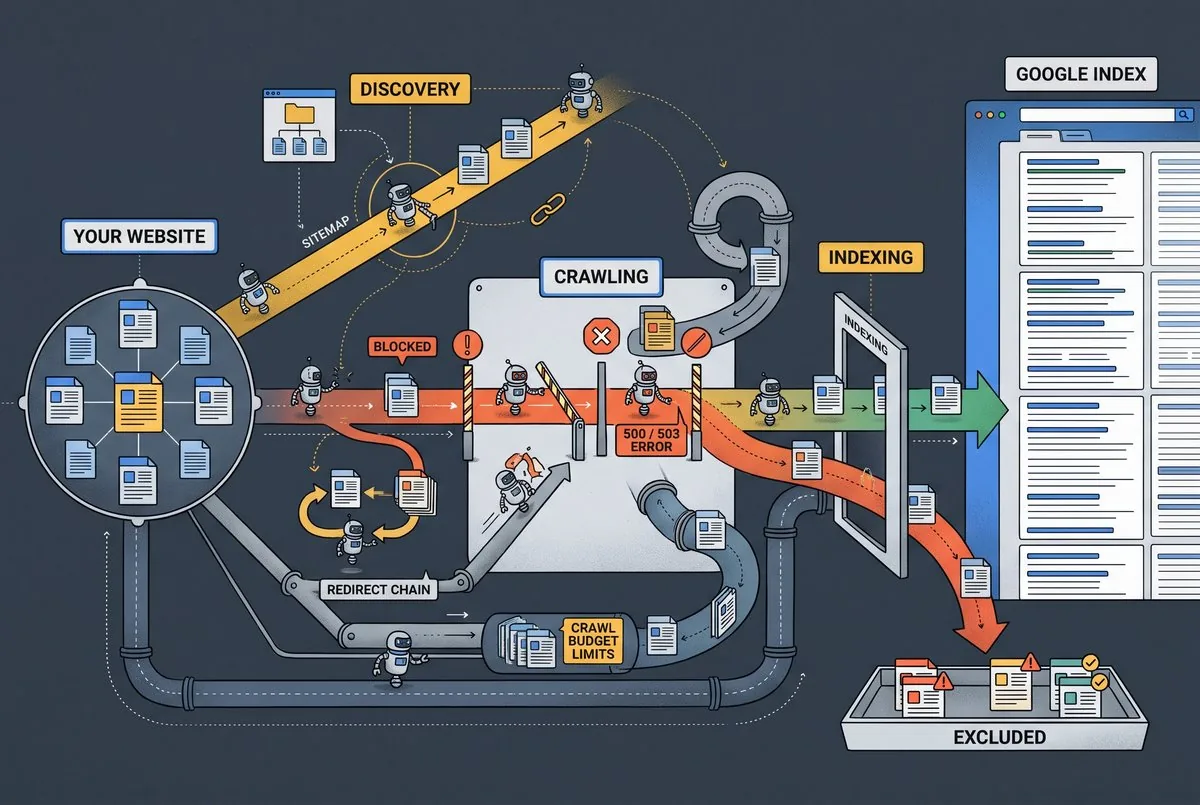
“Discovered, currently not indexed” means Google found your URL but hasn’t crawled it yet. If you’ve spotted this status in Search Console, that’s fine. It’s common and rarely means something’s broken. Simply put, Google’s attention is limited.
The Click2rank team has seen this status trip up site owners across dozens of client sites. So we know how confusing it feels when a known page just sits there, waiting. We’re keen to share what actually causes these delays.
By the end of this guide, you’ll understand the difference between discovery, crawling, and indexing. You’ll also learn to spot which URLs are affected and why. Since delays often come down to crawl budget, internal links, and site structure, let’s start with what the status means.
What Does “Discovered Currently Not Indexed” Mean?
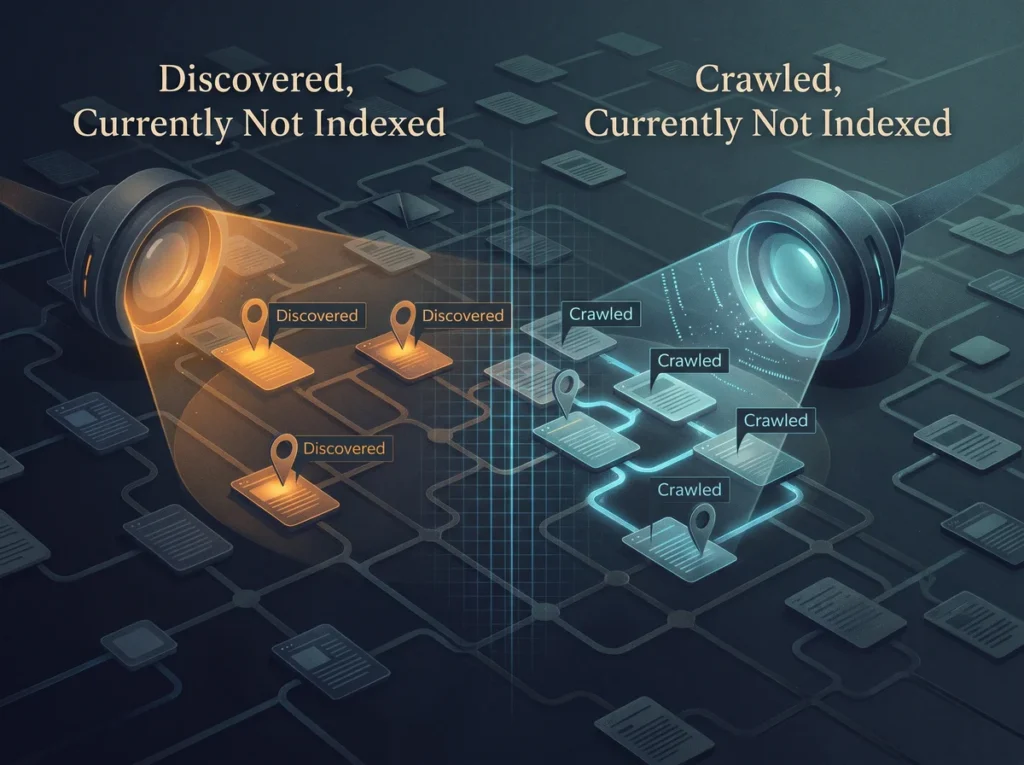
“Discovered, currently not indexed” means Google acknowledged your URL exists but hasn’t visited it yet. Google found a link, a sitemap entry, or another clue pointing to the page. That’s the discovery step, nothing more.
This status differs from “crawled, currently not indexed.” In that case, Google already visited the page but chose not to add it to search results. Here, no visit happened at all (something most people overlook until Search Console flags it).
You’ll find this status inside Google Search Console’s Page Indexing report. It groups URLs by their current state, so discovered pages sit separately from indexed ones. Checking this report regularly shows you exactly how many pages fall into each group.
However, the status itself isn’t a penalty. It simply means Google hasn’t gotten around to crawling that specific page yet.
Discovery vs. Crawling vs. Indexing: What’s the Real Difference?
Discovery, crawling, and indexing are three separate stages, and mixing them up causes most of the confusion around this status. Each one plays a different role in getting a web page to show up in organic search.
Discovery happens first. Google learns a URL exists through links, XML sitemaps, or other signals pointing to it. No actual crawling takes place yet; Google simply adds the address to a queue.
Crawling comes next. Google crawls the page, reading its content, code, and structure to understand what it offers. This step requires server resources and time, which is why it doesn’t happen instantly for every URL.
Indexing is the final stage. Once Google processes a crawled page, it stores relevant data in Google’s index, where a page can appear in search results. Here’s a quick breakdown:
| Stage | What Happens | Where You’ll See It |
| Discovery | Google notes the URL exists | Discovered, Page Indexing report |
| Crawling | Google visits and reads the page | Crawled, URL Inspection tool |
| Indexing | Google stores the page for search | Indexed, Page Indexing report |
Keep an eye on which stage your pages sit in. It tells you exactly where the holdup happens.
Why Does Google Delay Crawling Pages It Already Knows About?
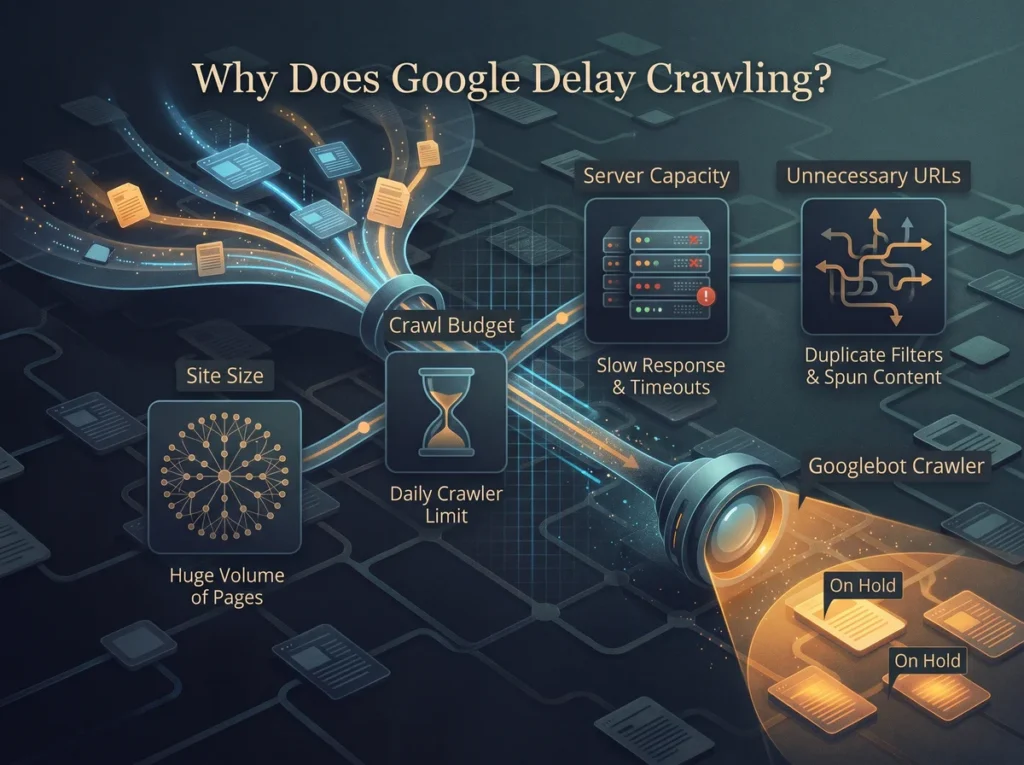
Google often knows a page exists for weeks before it ever sends a crawler to visit it. A few factors decide how fast Google gets around to a given URL, and most come down to limited resources on Google’s end. A tactical SEO audit often uncovers exactly which of these factors applies to your pages.
Crawl Budget and Why It Runs Out
Crawl budget is the limited number of pages Google’s crawler visits on your site within a set period. Every site gets a different allowance, based on its size, authority, and how often content changes. Once that budget runs out, Google simply stops for the day and picks back up later.
Low-priority or thin content pages often get skipped first when budget runs tight. Larger sites with tens of thousands of URLs feel this limit the hardest, since Google can’t crawl everything at once. That’s why some pages sit in “discovered” status far longer than others on the same domain.
Site Size and Crawl Scheduling
Bigger sites compete internally for crawl attention. Google spreads its crawl budget across every URL it finds, so sites with fewer pages naturally see faster turnaround. A small website usually gets fully crawled within days, while a sprawling one can take weeks.
If you’re wondering how many pages Google can realistically crawl daily, the answer depends on your site’s authority and server speed. Fresh content and strong site structure can speed things along. Still, scheduling ultimately comes down to how Google prioritizes your domain against millions of others.
Server Capacity and Response Times
Slow or overloaded hosting providers cause Google to pull back automatically. This reason protects both your server from overload and Google’s own crawling efficiency. Server logs often reveal repeated timeouts or delays, which tell Google to crawl less often until response times improve.
Once response times recover, crawling usually picks back up quickly. Until then, though, your crawl budget effectively shrinks because Google spends more time waiting than reading pages. Upgrading your hosting is often the first fix to try when logs show repeated timeouts.
Unnecessary URL Generation Eating Up Crawl Time
Filters, parameters, and auto-generated content create new URLs that waste crawl budget fast. An online store with color and size filters, for example, can generate thousands of near-identical URLs from a single product page.
Spun content and AI-generated pages only add to that pile. Picture a blog that auto-publishes hundreds of thin, reworded articles. Google’s crawler burns through its budget on those low-value pages instead of reaching the ones you actually want ranked.
How Poor Internal Link Structure Slows Down Crawling
Fixing your internal links is one of the fastest ways to get a buried page noticed again. Here’s where most sites go wrong: they publish pages, then forget to link to them from anywhere else on the site. That gap creates orphan pages with no internal links pointing to them, and those are harder for Google to find twice.
Deep pages buried several clicks from the homepage often get crawled less often, too. Strong internal linking shows Google which pages carry the most weight, and that directly guides crawl priority.
A quick checklist for spotting weak spots:
- Pages with zero internal links pointing in
- URLs buried five or more clicks deep
- Orphan pages missing from every menu
- Thin navigation between related content pages
Clean up these gaps, and discovered pages will move toward crawled status faster. Plus, don’t forget to check your site’s link structure every few months.
Does URL Quality Affect Whether Google Crawls a Page?
Not every URL gets equal treatment, and messy ones often end up at the back of the line. Think about it this way: Google treats messy URLs the way you’d treat junk mail. You must pass them without a second look in the junk folder like everyone. Pages packed with excessive parameters often look low-value to Google’s crawlers right away, and that alone can push them further down the queue.
When duplicate content and near-duplicate URLs pile up, they often get deprioritized during crawl scheduling as well. Thin content pages, ones with barely any original content, send a similar signal.
So what’s the underlying issue here? Google wants to spend its limited crawl budget on pages worth indexing. Content with real quality issues, like duplicate or auto-generated text, rarely earns a fast crawl. On the other hand, clean, descriptive URLs with original content tend to move through the queue faster.
That clarity helps Google make quicker crawl decisions overall.
Finding Your Affected URLs in Google Search Console
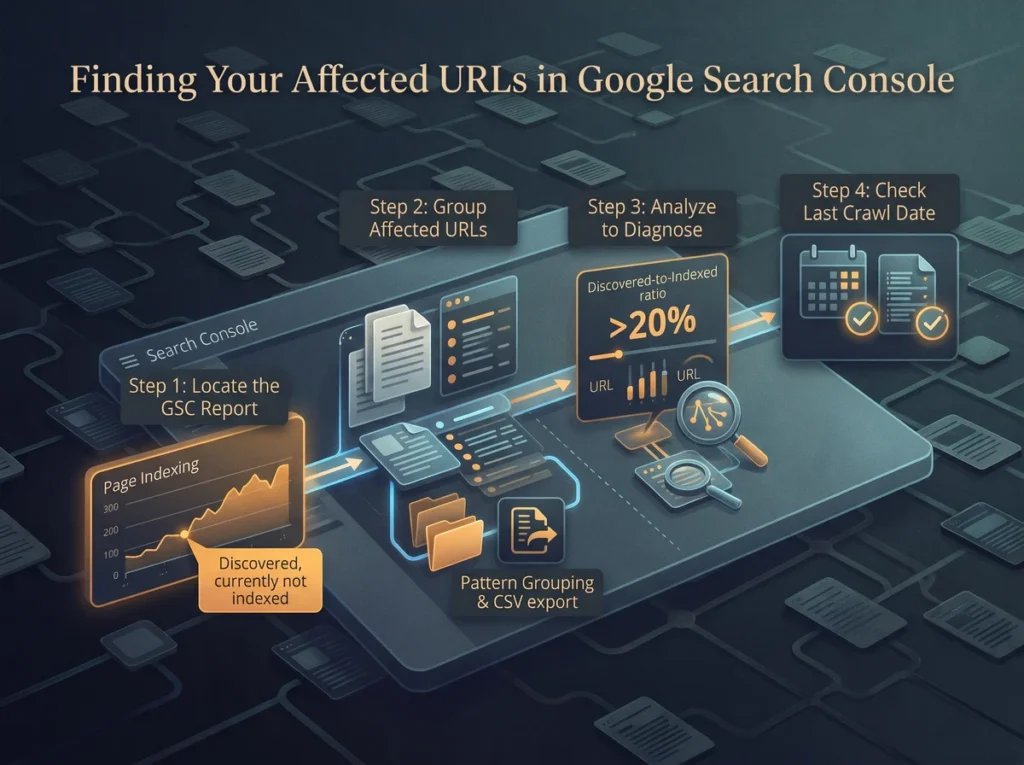
Google Search Console’s Page Indexing report is where every affected URL shows up first. From what we’ve seen across different client sites, grouping URLs by folder speeds up diagnosis right away.
Here’s how to track down every discovered URL sitting in limbo.
Step 1: Locate the Discovered Currently Not Indexed Report
Start by opening Search Console and heading to the Page Indexing report under the Indexing menu on the left sidebar. Scroll down to the “Why pages aren’t indexed” table, where you’ll spot “Discovered, currently not indexed” listed as one row among several status types.
Click that row, and Search Console pulls up a list of URLs indexed under that exact status (Google shows up to 1,000 examples per issue). You’ll see URL paths, last-seen dates, and a download option for deeper analysis. This overview gives you a starting point that’s more useful than guessing which pages got missed.
Step 2: Group Affected URLs by Pattern
Next, export the list as a CSV file and sort it by folder, URL type, or parameter string. When you group by shared structure, patterns across dozens or even hundreds of URLs become obvious fast.
For instance, product pages with color and size filters often cluster together under one path pattern. Spotting that cluster early saves hours compared to checking each specific page one by one, and it points straight to the fix, trimming filter-based URLs at the source.
Step 3: Compare Discovered URLs Against Indexed Pages
Once you’ve grouped the URLs, calculate the ratio between discovered-only URLs and indexed pages across your entire site. Upon seeing a ratio above 20%, that usually signals crawl budget strain rather than a handful of unlucky pages.
Apart from the ratio itself, the URL Inspection tool lets you run a quick live URL check on sample pages from the flagged group. That live test renders the page exactly as Googlebot would see it, right down to blocked resources or redirect chains.
Step 4: Spot Crawl Budget Issues in the Data
Finally, check the last crawl date listed for each affected URL inside the inspection results panel. When that crawl date keeps pushing further into the past across multiple pages, your site is very likely facing real crawl budget issues.
Server logs can confirm this from Google’s side, showing exactly how often Googlebot visits and which paths it skips. Together, these two data sources paint a much clearer picture than Search Console alone.
What Has John Mueller Said About Crawl Delays?
John Mueller works as a Search Advocate at Google. He answers SEO questions from site owners through Google’s public Search Console office-hours sessions and Q&As. Site owners have asked him directly about this exact status more than once, since Google’s own help documentation only lists one short reason for it.
Mueller has pointed to two main causes behind this underlying issue: server capacity and overall website quality. When a server struggles to handle requests, Google pulls back on crawling to avoid piling on more strain.
The bottom line is pretty simple: Mueller’s answers rarely promise a quick fix. He has noted that waiting is sometimes the only realistic option once crawl budget and site quality both play a part.
That doesn’t mean you’re stuck doing nothing, though. Patience plays a real role alongside the technical fixes covered earlier.
Simple Ways to Improve Crawl Accessibility
A few practical changes can make your pages far easier for Google to find and crawl. In our experience improving crawl accessibility for client sites, internal linking fixes tend to show results fastest. These four fixes address the most common accessibility gaps we see:
- Strengthen Internal Links: Fresh links from high-traffic pages signal that a buried URL still carries weight on your own website. This often speeds up rediscovery faster than any other single fix on this list, especially for orphan pages.
- Improve Server Speed: A stable hosting provider gives Google fewer reasons to pull back on crawling. Slow response times or frequent downtime push Googlebot toward crawling less often, so fixing this frees up room for more frequent visits overall.
- Reduce Unnecessary URL Variations: Filters, sort options, and tracking parameters often generate thousands of near-duplicate URLs. Blocking or consolidating these paths frees up crawl budget for pages that need Google’s attention, like product pages or core landing pages.
- Keep Your Sitemap Current: Submitting an updated XML sitemap won’t fix every discovered URL on its own, but it helps confirm which pages you consider worth indexing. Pair this with a request indexing action in Search Console for high-priority pages.
These fixes work best together rather than in isolation. None of them guarantee immediate results, but each one removes a barrier that was slowing Google down.
How Long Should You Expect This to Take?
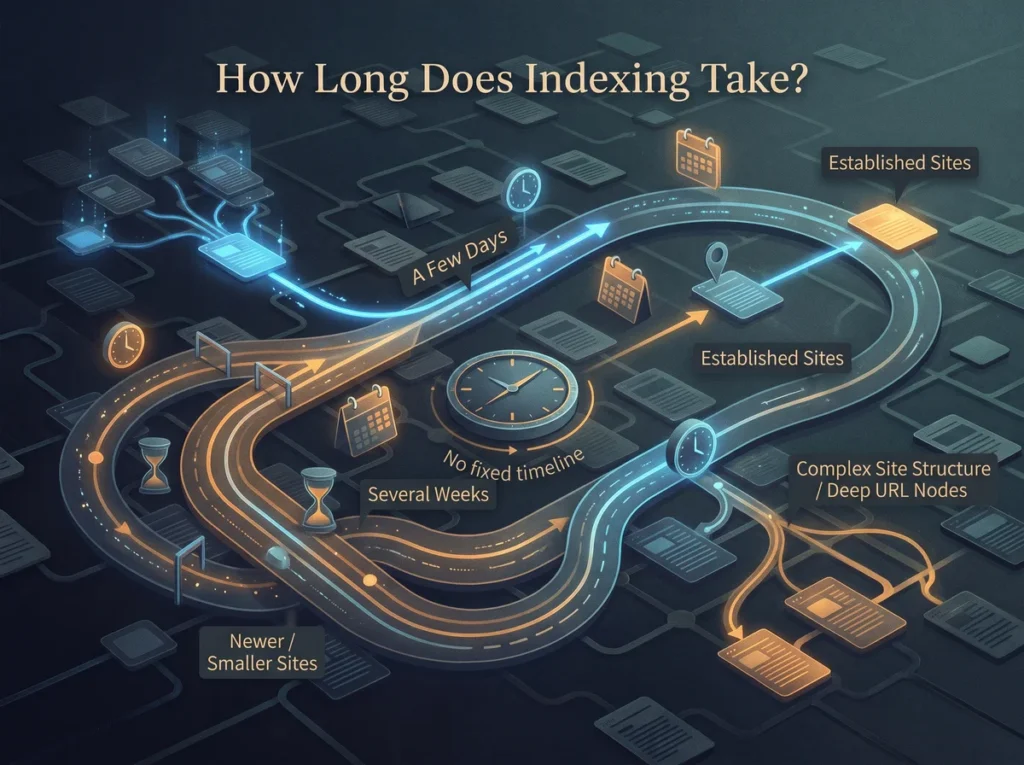
There’s no fixed timeline, but most delays resolve anywhere from a few days to several weeks. Crawl delays can stretch longer for larger sites, since Google spreads its attention across every page it finds.
Newer or smaller sites often face longer waits, too, simply due to limited crawl history with Google. That’s because a brand-new domain hasn’t earned the same crawl priority as an established one with years of organic search visibility behind it.
So what’s realistic to expect? One page might move from discovered to indexed within a week. Another specific page on the same site could sit untouched for a month, especially if it sits several clicks deep with no internal links pointing to it.
Bottom Line: Google’s crawling pace varies by site, demand, and how much human involvement went into fixing the underlying issues.
Monitoring Progress the Right Way
Many people either ignore this status completely or check it obsessively, and neither approach works well. So what’s the middle ground? Checking Search Console weekly shows whether discovered URLs are slowly decreasing over time.
Sudden drops or increases in discovered counts often reflect recent site changes, like a new product launch or a site migration. When that happens, it’s worth noting the change date before assuming something’s wrong. Patience paired with consistent monitoring works far better than firing off repeated manual indexing requests.
Here’s a simple routine worth sticking to:
- Check the Page Indexing report weekly
- Watch for drops in discovered URL counts
- Track indexed page growth over time
- Skip daily manual indexing request spam
- Note any crawl budget issues in logs
Want to know the real test? Consistency, not obsession, moves the needle here.
The Waiting Game: What You Can Control Right Now
Crawling delays are normal, and this status alone doesn’t mean something’s broken on your site. Strong internal linking and clean URLs give Google clearer crawl priorities to work from, and that’s within your control.
At the end of the day, steady monitoring beats panic every time. Check weekly, fix what you can, and let Google handle the rest; it’s a safe bet for most site owners.
If you’d rather have a second set of eyes on your crawl setup, fill out the form and we’ll walk through it together. There’s no need to guess your way through this alone.
Frequently Asked Questions About Discovered Currently Not Indexed
Still have a few questions left? Here are five common ones worth clearing up.
What Does “Indexed Status” Show You in Search Console?
Indexed status tells you whether Google has stored a page for search engines to surface in results. It’s different from discovery or crawling, since those happen before a page ever reaches indexed status.
Can Content Quality Issues Cause a Page to Stay Discovered But Not Indexed?
Yes, content quality issues sometimes play a role alongside crawl budget. Low-quality or thin pages often get deprioritized, so fixing quality issues can help Google justify spending crawl budget on them.
Does This Status Affect E-commerce Sites Differently Than Other Sites?
E-commerce sites often see this more than other sites, mainly due to filter-generated URLs. Different pages across a large catalog compete for the same limited crawl attention, which can bury more important pages behind duplicate variations.
Should You Always Run a Test Live URL Check Before Requesting Indexing?
A test live URL check isn’t required every time, especially if you’re dealing with how many URLs your site generates daily. It’s most useful for confirming a specific page renders correctly before asking Google to prioritize it.
Can AI-Generated Content or Auto-Generated Pages Cause This Same Issue?
Yes, AI-generated content and auto-generated pages can trigger the same issue as thin or duplicate content. Different stages of Google’s crawling process treat these pages with caution, which can prevent Google from indexing them quickly.